If you’re running digital ads for your facility, you’re not really looking for clicks. You’re looking for completed transactions. The trouble is that most owners can only see the former.
Having worked with hundreds of sports facilities, we've seen it all the time — knowing if your ads are working is nearly impossible. When an owner wants to know whether a campaign actually paid off, the workaround is almost always a manual check. That means getting a bookings report from their scheduling software, a CSV export from their ads platform, and manually checking the names across two browser tabs.
Technically this works, but it takes time, energy, and you only ever check the campaigns you're actually curious about.
This guide explains what it is, why it matters for your facility, and what changes once you have it.
Let’s jump in!
What Is Conversion Tracking for a Sports Facility?
Conversion tracking connects your online booking page to your advertising accounts, so platforms like Meta and Google can see which of their ads produced completed transactions — not just clicks.
Three words do most of the work here, and none of them are as complicated as they sound.
A pixel is a small piece of tracking code that a platform like Meta or Google gives you. Think of it as a connector between your booking page and your ad account.
An event is something a customer did that the pixel reports back. Someone looked at your camps. Someone started a booking. Someone paid.
A conversion is the event you care about most. For a sports facility, that’s generally a completed purchase. That could be a cage rental, a week of camp, a credit package, a membership, etc.
Can I add a Meta or Google pixel to my booking page?
Yes, if your booking software supports it. For a sports facility running Swift, the feature is called Conversion Tracking, and it works with Meta, Google Analytics, Google Ads, TikTok and X. It lives in your Swift settings, and there’s a full walkthrough further down.
This comes up a lot, because your booking page is a separate system from your website, so the usual “paste this snippet into your site” instructions don’t apply.
What Conversion Tracking Isn’t
It’s not a report you read. Turning it on doesn’t produce a dashboard you check on Fridays. It feeds your ad platforms data, where the value is in the optimizations that can be made for the future.
It isn't a list of who visited. You won't be able to see individual users, only counts and dollar values — how many people started a booking, how many finished, and how much revenue that equated to.
It can’t fix a bad offer. If your camp is priced incorrectly, or your clinic is at a time nobody can make, tracking will surface that to you. It won’t solve it — it just stops you from blaming the ads.
It’s not instant. Ad platforms need time and volume before any of this gets smart. If you’re spending a few hundred dollars a month, give it a season, not a week.
Why This Matters for Your Facility
Most owners we talk to didn’t get into this to run ad campaigns. They got into it for the athletes, and for the kind of place they wanted their community to have.
Ads are just how a lot of families find you now.
And those families are committing real time and money to their kids’ development. The Aspen Institute’s Project Play surveyed 1,848 parents in 2024 and found the average family spends around $330 a year on lessons, instruction and camps for their child’s primary sport, out of just over $1,000 across everything — travel, league fees, equipment, and the rest. That’s a serious investment, and it usually goes to one or two places they trust.
So the question isn’t how to squeeze more revenue out of your ads. It’s how to stop wasting the budget you’ve already set aside — because a dollar spent on an ad that never reached anyone is a dollar that could have gone into coaching, equipment, or other business improvements. Marketing is one of the channels that decides whether a facility is profitable at all, it's just one of the hardest to measure.
What Does Conversion Tracking Actually Tell You?
Four things, roughly in the order they tend to matter.
#1 — You find out which ads actually make you money
Right now you’re probably judging campaigns on clicks, or on a general sense that things feel busy.
With tracking on, you can judge them on the only number that matters: how much it cost you to acquire a completed transaction.
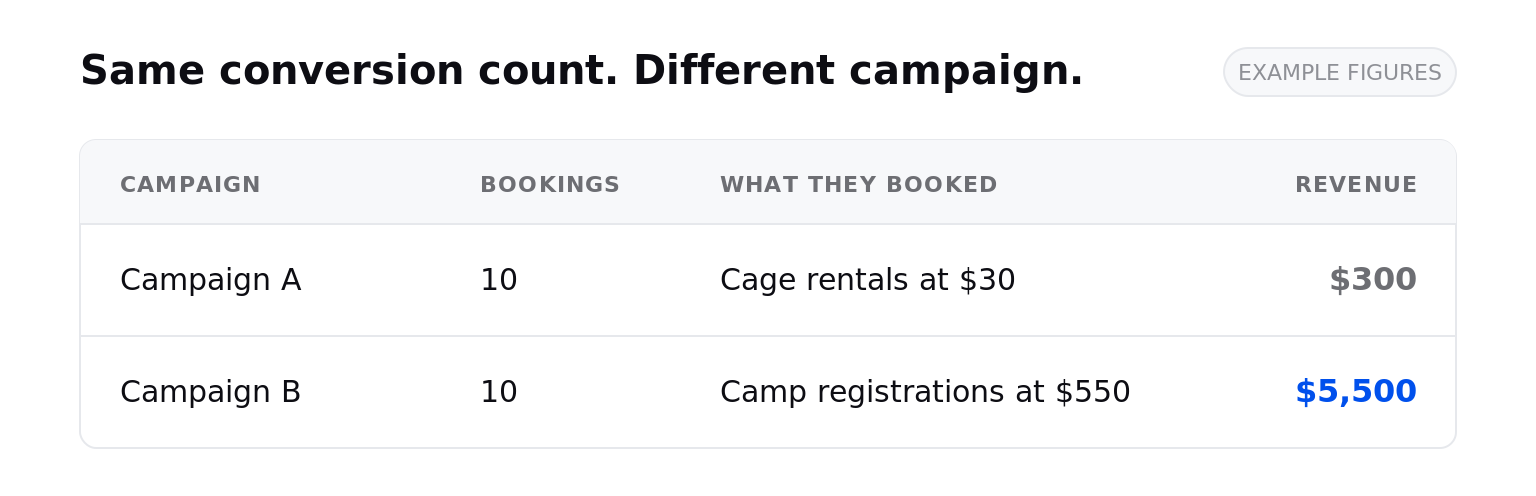
And because your platforms can see the dollar value of each transaction, not just the count, you get a truer picture than a conversion tally would give you. A $30 cage rental and a $550 week-long camp registration are both one conversion. A campaign driving 10 rentals and one driving 10 camp bookings look identical in count, but very different in revenue, with the latter being the one that should decide your budget. It's the same logic behind favoring groups and memberships over one-off rentals — the goal isn't more transactions, it's more valuable ones.
Tracking also lets you set your ad campaigns to optimize for return on ad spend (ROAS) rather than volume. From there the platform pushes budget behind the ads earning the most revenue per dollar spent — so more of your budget flows toward your most valuable offerings instead of just your most popular ones.
#2 — You find out where you’re losing bookings
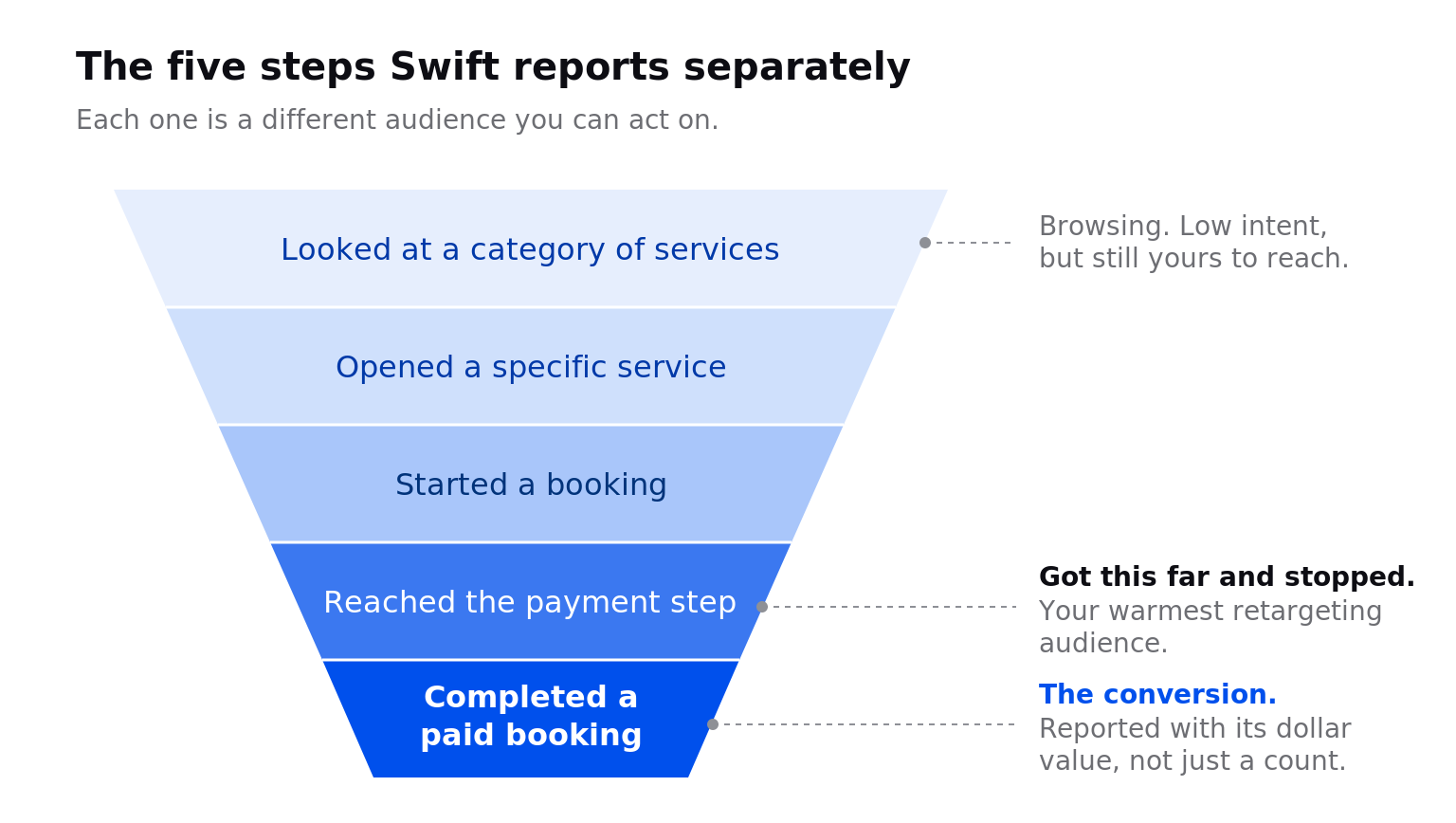
Tracking doesn’t just tell you whether someone booked. It tells you how far they got — whether they only looked at your camps page, opened a specific camp, started a booking, or made it to the payment screen before stopping.
Swift reports each of those steps separately, which turns a vague problem into a specific one. If people are viewing your memberships and never starting checkout, that’s usually a pricing or clarity problem, not an ad problem — your ad did its job by bringing someone to your booking page. If they’re starting checkout and abandoning at the payment screen, something at that final step could be scaring them off.
Either way, you now know which thing to fix instead of guessing.
#3 — You can bring back the people who almost booked
Every facility has people who come close to booking but don’t. They picked a time. They pulled out their card. Then something interrupted them.
You can’t call them and you can’t email them, because they never gave you a number or an address. But you can still put an ad in front of them.
That’s retargeting: showing ads to people who already interacted with your facility instead of to strangers.
Without tracking, those people are indistinguishable from someone who accidentally clicked your ad and came to your booking page. With tracking, you can group them by how close they got:
- Everyone who visited your booking page
- People who looked at a specific service, like your winter clinics
- People who started a booking and didn’t finish
- People who reached the payment screen and stopped
That last group is the warmest audience you have — a reminder a few days later is often all it takes.
It’s cheap advertising, too, for a reason that’s easy to miss: with a cold audience you’re paying to introduce yourself before you can sell. With retargeting you skip the introduction entirely.
A few ways facilities use this:
- Someone browsed spring break camps in February and didn’t book. They see a “spots are filling up” ad in early March.
- Someone rented a cage once. They see an ad for your 10-session package.
- Someone looked at memberships twice and never signed up. They see a member testimonial.
None of that is possible without conversion tracking in place first. The tracking is what builds the list.
#4 — Your ad platforms start looking for the right people
When Meta or Google can’t see purchases, they optimize for whatever they can see — usually clicks. So they go and find people who love clicking ads but never book anything.
Show them real bookings and that changes in two ways.
The first happens on its own: your campaigns start targeting people who book instead of people who click.
The second you do deliberately. Once the platforms know who paid you, you can ask them to go find more people like those customers — that’s called a lookalike audience. But the output is only as good as what you feed in. If you’ve built one before, it was probably from website visitors because that’s all you had. That’s a list of browsers, not buyers, so the platform goes and finds you more browsers.
Build it from your paying customers instead and it’s looking for people who resemble the parents who registered for camp, not the ones who skimmed the page. Because Swift reports what each booking was worth, you can go further and seed it from your highest-value customers — the families buying camp weeks and memberships rather than one-off drop-ins. Same ad budget, better raw material.
Fair warning on both: this takes volume. If you’re newly open or running a small budget, retargeting will do more for you sooner.
A Simple Playbook
If you take nothing else from this:
Judge campaigns on cost per conversion, not cost per click. Everything else is a proxy.
Fix the leak before you raise the budget. More traffic into a checkout people abandon just costs more.
Retarget before you prospect. The people who almost booked are cheaper to convert than strangers.
Build audiences from buyers, not browsers. Your customer list is better raw material than your visitor list.
Give it a season, not a week. These systems learn slowly at facility-sized budgets.
How to Set Up Conversion Tracking on Your Booking Page
On Swift, setup takes about 2 minutes and doesn't require any coding. Go to Settings > Integrations, scroll to Conversion Tracking, click Connect on the platform you want, and paste in the tracking ID from that platform.
Each platform keeps its ID in a different place and calls it something different, which is the genuinely annoying part. Our Conversion Tracking help article walks through exactly where to find each one.
If this feels like a lot, don’t connect all five. Connect the platform where you spend the most money, give it a few weeks to gather data, then build your first retargeting audience from the people who almost booked. That’s the shortest path from “tracking is on” to “tracking made me money.”
.png)
Conversion Tracking is available on the Standard and Premium plans and is enabled per account. Contact our team at support@runswiftapp.com to have it switched on for your facility, or if you’d like to talk about upgrading your plan. If you’re weighing whether Swift is the right fit more broadly, book a free demo and we’ll walk you through it.
Frequently Asked Questions
What is retargeting, and how does it work for a sports facility?
Retargeting is advertising aimed at people who have already been on your booking page, viewed a service, or started a booking without finishing. Conversion tracking is what makes those audiences possible, because it tells your ad platform who those people are. The highest-value retargeting audience for most facilities is people who reached the payment step and didn’t complete their booking.
What is a lookalike audience?
A lookalike audience is a new audience the ad platform assembles for you, modelled on a list of people you already know are a good fit. The quality depends heavily on the list you start from. Building one from people who actually paid you produces far better results than building one from general website visitors.
Which advertising platforms does Swift support?
Five: Meta (Facebook) Pixel, Google Analytics (GA4), Google Ads, TikTok Pixel, and X (Twitter) Pixel. You can connect any combination, and each works independently.
Does conversion tracking require a developer?
No. There’s no code to paste. You copy a tracking ID from your advertising platform and paste it into the matching card in Swift, then click Save.
Can I use Google Tag Manager on my booking page?
Swift doesn’t support adding a full Google Tag Manager container or custom scripts to the booking page. However, the two things most facilities use Tag Manager for on a booking page — Google Analytics and Google Ads conversion tracking — are both supported natively, so most facilities don’t need it.
What events does Swift track?
Viewing a service category, viewing a specific service, starting checkout, reaching the payment or booking summary step, and completing a booking. Completed bookings include the booking value and currency, so platforms can report revenue.
Does conversion tracking work for camps, memberships, and packages?
Yes. Tracking applies to all bookable types, including rentals, lessons, camps, classes, memberships, and packages.
Why am I not seeing conversions after connecting my pixel?
Check that you pasted the correct ID type for that platform, since mixing up a Google Analytics Measurement ID and a Google Ads Conversion ID is a common error. Confirm the card shows as Connected, confirm the ID is active in your ad account, and allow time, since platforms can take minutes to hours to display newly received events.
Does it track bookings made through the branded mobile app?
Not currently. Conversion events fire on the Swift web booking page only.

.png)