Summer may be coming to an end, but the Swift team has been hard at work pushing updates to get your facility ready for the cooler months! 🍁💪
P.S: If you missed last month’s updates, be sure to catch up. We shipped revenue categories, QuickBook & CatchCorner integrations, and wrote about some of the bigger additions that launched early on in August.
August Product Updates
Here’s a look at what shipped this month and a few extras coming soon:
- Swift AI connector (Claude/ChatGPT 🤝 Swift)
- Home page dashboard
- Membership report
- Automatic waitlist notifications
- + dozens of quality of life improvements and bug fixes
🤖 Swift AI connector (Claude/ChatGPT 🤝 Swift)
We've been teasing this one for months, and we're finally ready to hand it over! You can now have an actual conversation with your facility's data.
Previously, you had to know which report held what you were after. Comparing two periods meant exporting both and lining them up yourself. And a simple "how do I…" question meant going through the Help Center or emailing support and waiting for a response.
The Swift AI Connector changes how you get those answers. Connect Swift to the AI assistant you already use and ask in plain English:
- "How much revenue did we do last month compared to the same time last year?"
- "How many customers still have unused credits?"
- "What does my Saturday schedule look like?"
- How do i bulk import customers into Swift?"
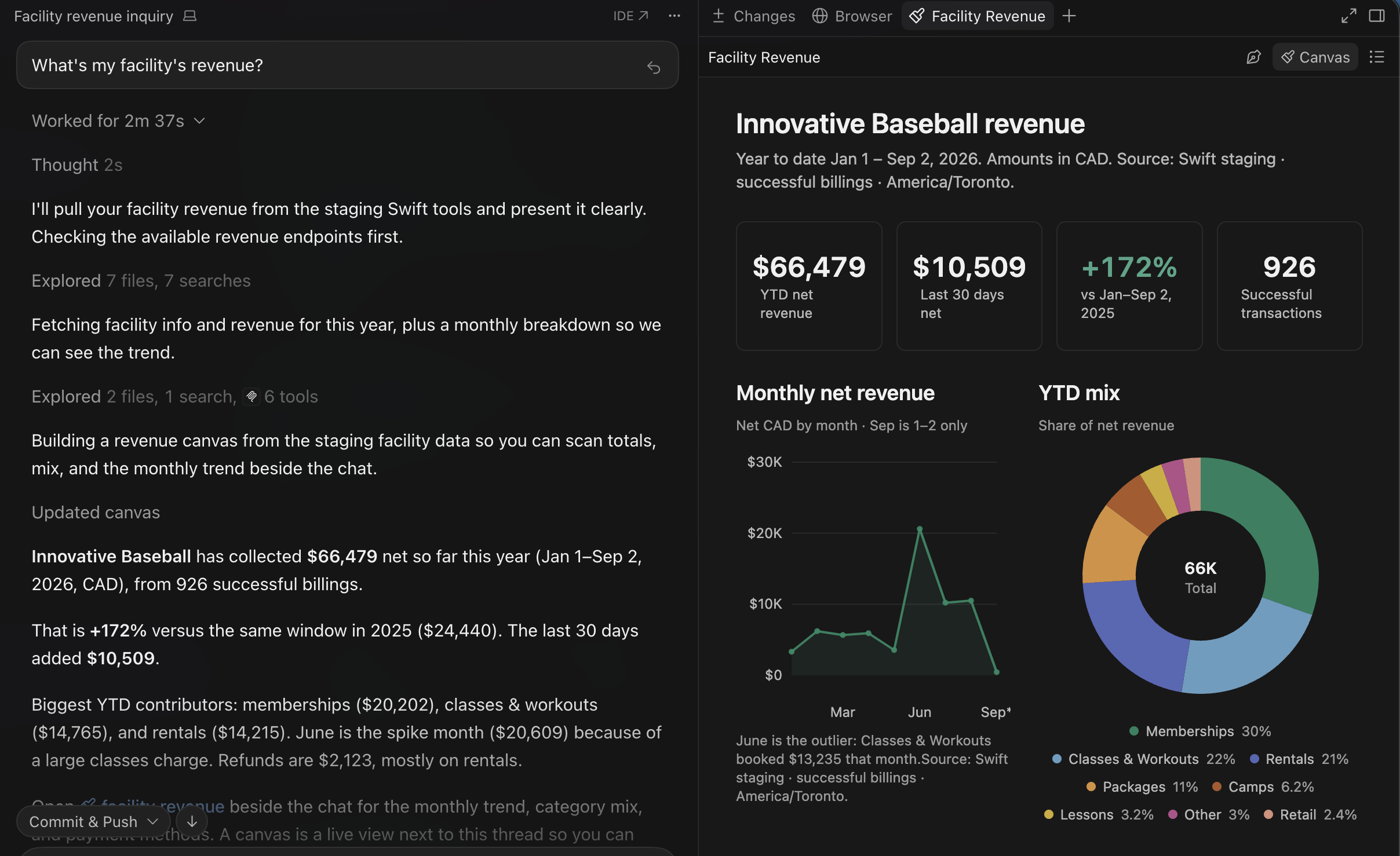
The connector reads 50+ areas of your live facility data (bookings, customers, revenue, invoices, credits, payroll, etc.) as well as the Swift Help Center, so you can ask about your own facility, or figure out how to export that one report that you need every tax season. It works with any MCP-compatible assistant, including Claude, ChatGPT, Cursor, and more.
Because this is your facility's data, the boundaries are strict:
- Every question is scoped to your own facility. You'll never see another facility's data, and no one will ever see yours.
- Staff can only ask about what their role already lets them see in Swift, so a front desk login can't pull your revenue numbers.
- The connection is read-only, so nothing ever gets changed by accident.
Setup takes a couple of minutes. In Swift, head to Settings → Integrations and scroll down to the AI Connector (MCP) card, then copy your facility's server URL, and paste it into your assistant. Step-by-step instructions for each supported AI assistant can be found in the setup guide.
.png)
Please note: the Swift AI Connector is available exclusively on the Growth plan and above. If you don't see it under Settings, or you're interested in upgrading your facility, please contact our support team at support@runswiftapp.com.
🏠 Home page dashboard
Up until recently, the "Home" tab in Swift hasn't given you much to work with — it was pretty much blank actually.
The home tab finally has a purpose! It's now an intelligent dashboard that shows you everything you need to know at a glance — revenue growth, best-selling services, occupancy rates, and more. It'll even surface things that need your attention, like low retail stock or failed membership payments.
The best part? Staff get their own version of it. The dashboard follows the same role permissions as everything else in Swift, so a coach sees upcoming bookings, attendance rates, and the numbers that matter to their day, not your revenue.
.png)
📊 Memberships report
Many facilities lean on memberships to offset the seasonality of the business. When camps wind down and the lesson calendar thins out, memberships are what's still billing — and for a lot of facilities that can be a large share of the year's revenue.
In the past, there was no easy way to understand how memberships were helping you grow your business. Questions like “Which membership types are selling?”, “How many members did I have in August this year compared to last?”, “Who cancelled?” all went unanswered.
Now there's a memberships report that puts all of it on one page. Head to Reports → Memberships and you'll see what you're earning each month, how it's trending, and who joined or left — with every member listed underneath.
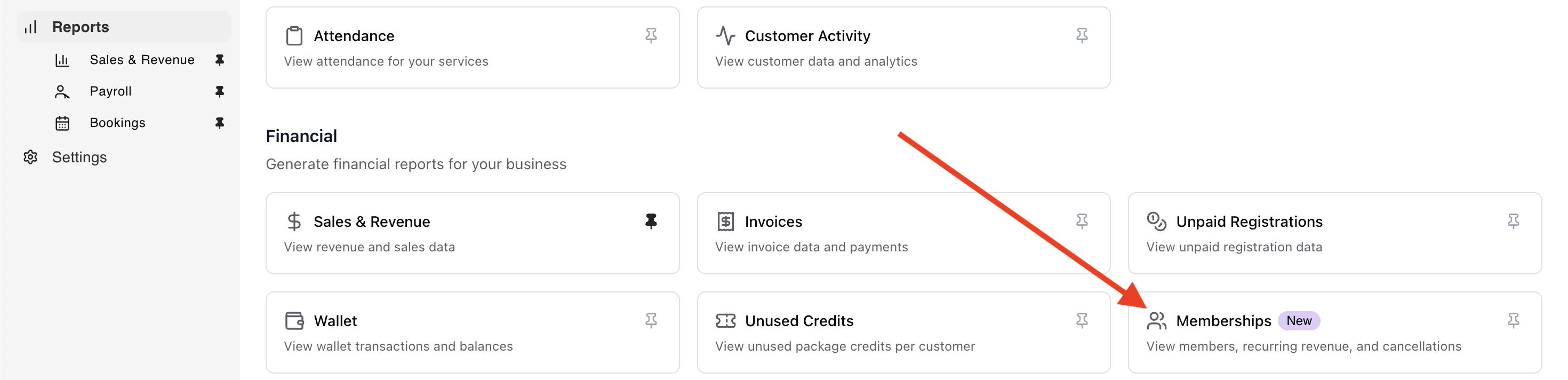
Filter down to a single membership type to see which of your offerings is pulling its weight, or export the whole thing when your bookkeeper asks. Or link the Swift MCP to your favourite AI assistant and just have them get the answers for you 👀
The point is to catch a membership that's quietly losing people before it costs you a season, and to know which ones are worth selling harder.
.png)
Please note: the Memberships report is only available to facilities that are using Swift's own internal billing platform. If you have not migrated over to the new membership platform, which includes 2.9% lower processing fees on membership payments, or are unsure whether you already switched, contact our support team at support@runswiftapp.com — we'll check and get you moved over if needed.
🔔 Automatic waitlist notifications
Memberships carry the quiet months. At peak, camps and classes have the reverse problem: demand runs past your capacity, and the spots you add are only worth something if the people waiting hear about them.
Previously if you had a full camp or class with waitlist enabled, your customers would be notified only if someone else dropped out of the session. But if you went in and increased the session size yourself, going from 12 to 15 kids for example, no one would be notified. You’d have to send out a mass email or text message to let everyone on the waitlist know at the same time.
Not anymore. Increasing the capacity on a camp or class now triggers the same waitlist notifications that a cancellation does. Everyone on the list is notified by email and SMS the moment you save the change, and spots go first come, first served. The people waiting hear in seconds instead of whenever you get around to it, and the spots you just opened actually get filled.
Note: waitlists are available exclusively on the Growth plan and above. If you're interested in upgrading your facility, please contact our support team at support@runswiftapp.com.
🛠️ Other improvements
Drag and drop to reorder. Ordering your services used to mean clicking an up or down arrow one row at a time. Now you grab a row and drag it — on every list in Admin that had those arrows, from classes and camps to rooms, equipment, packages and the service tiles on your booking page.
Repeat options, redesigned. Setting up a recurring class or camp meant working through a repeat window that didn't behave like the calendar tools you use everywhere else. It now follows the same pattern as Google Calendar — set the interval, pick the days, choose when it ends.
🛣️ The road ahead
At Swift, we’re locked in on helping your business grow and making your life easier as a facility owner, staff, coach, and customer.
Here’s a quick look at what’s coming next:
- Service collections & groups
- SMS blasts
- A redesign of our service forms
- Swift sites!
- And the one we’re most excited for, an AI front desk agent for your business (sign up for early access here)
Have questions about this update or anything else in Swift? Just shoot us a message at support@runswiftapp.com — We’re always here to help.
Thanks for reading!