The weather may be cooling down but the team at Swift knows your business is only heating up! This month we launched changes to improve your experience and started gearing up for some big feature drops!🍁🔥
P.S: If you missed last month’s updates, be sure to catch up. We shipped the Swift AI connector, home page dashboard, the Memberships report, and automatic waitlist notifications.
Before we get started, a special announcement...
[[text-CTA]]
Okay, now let's get to the updates!
September Product Updates
Here’s a look at what shipped this month and a few extras coming soon:
- Service collections
- Retail product checkout
- Subtotal editing
- + dozens of bug fixes and improvements
🗂️ Service collections
If your facility offers a lot of services, your booking page can turn into one long list. Classes for every age group, lessons for every coach, rentals for every room. Customers have to scroll past all of it to find the one thing they came to book.
Service collections fixes that. Group similar offerings so your customers can find and book what they need. Some examples we've seen so far include:
- Rentals by cage length
- Lessons by instructor
- Camps and classes by age group
Not sure where to start? We’ve integrated Swift AI to give you a jumping off point. Just hit get suggestions and our AI will look through your current live offerings and present some suggestions on how to group them.
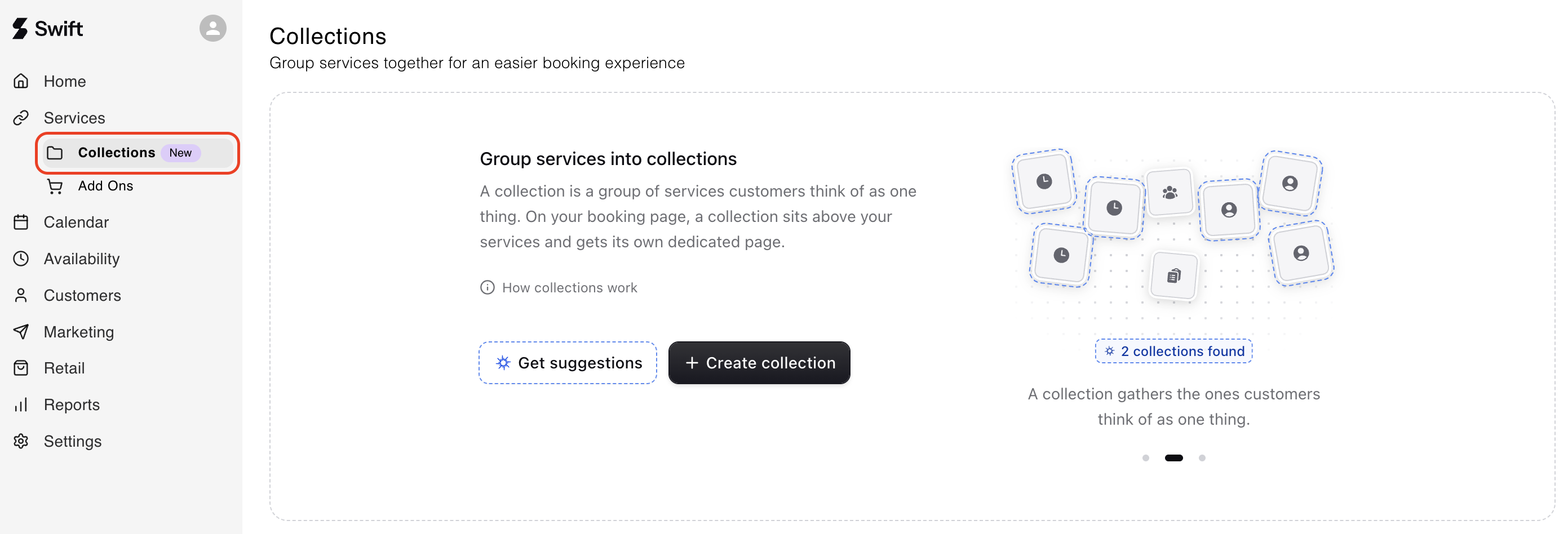
Service collections are available on all plans, and can be found under Services → Collections. We also have a dedicated help center article to guide you through initial setup.
🛍️ Retail product checkout
Selling a Gatorade or a water bottle when someone's paying for their booking at the front desk is an easy way to increase your average cart value. Until now, there was no way to do both in one checkout. The booking was done in the Calendar tab and the drink was rung up in Retail, as two separate transactions.
The only workaround was creating a service add-on for every item you sell, which gets cumbersome fast if you stock a lot of drinks, snacks, or gear.
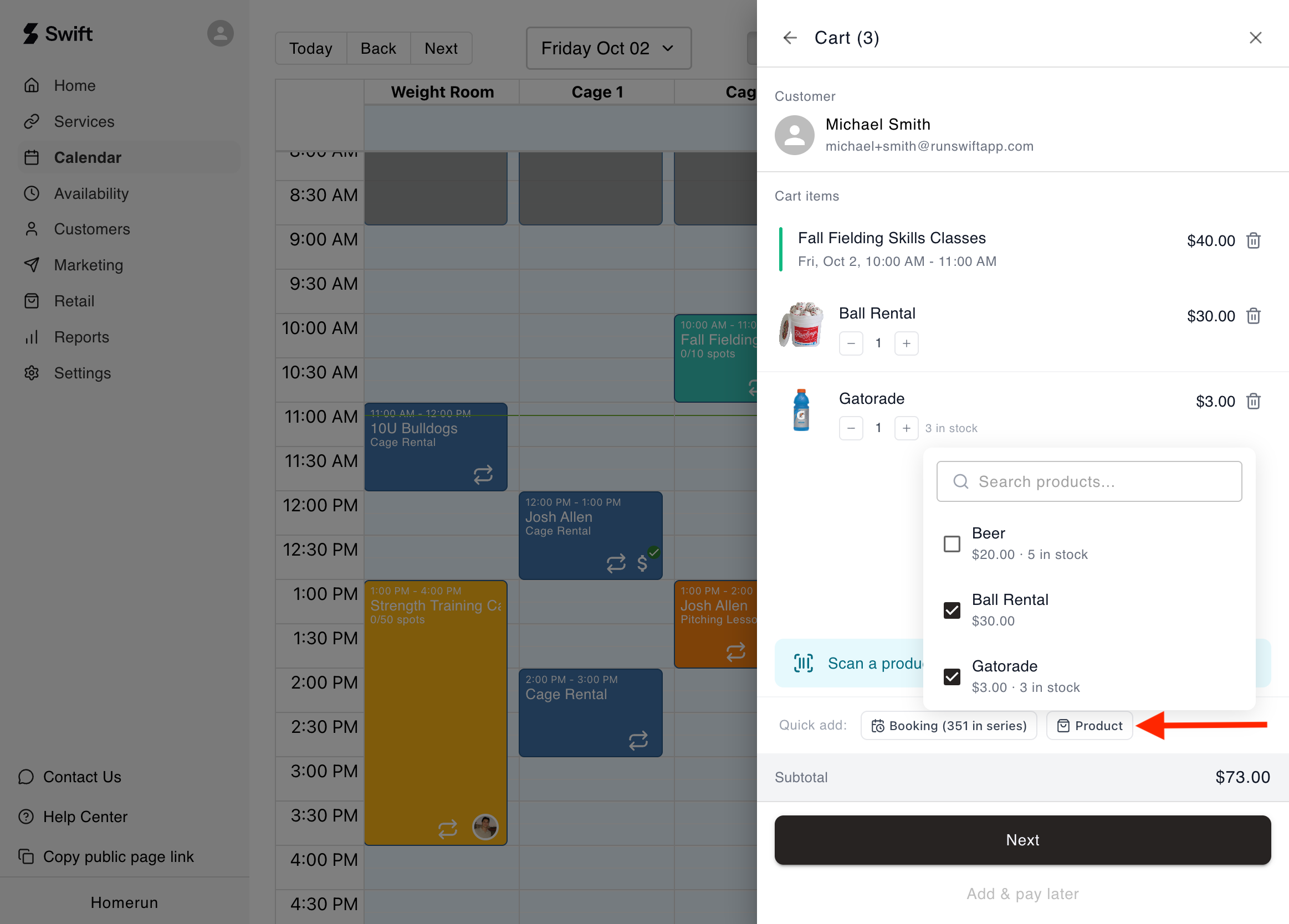
Now you can add retail products right into a booking's checkout, pulled straight from your existing catalog.
- One checkout, one screen. No switching tabs to ring up a second sale.
- One transaction, not two. The booking and the purchase are recorded together, so there's one sale to reconcile in your books.
- No add-ons needed. Your items work at checkout as they are.
💵 Subtotal editing
Custom pricing comes up all the time, whether it's a regular getting a break on a lesson or a team rate you agreed on over the phone. Previously, checkout only let you edit the total, so landing on that price meant working backwards from the number you wanted and figuring out the fees and taxes by hand.
Now you can edit the subtotal instead. Enter the price you agreed on and Swift calculates the fees and taxes on top of it, so there's no more math at the front desk and every custom-priced sale carries the right tax.
.png)
🛠️ Other improvements
Resize columns. You can now drag to resize columns in your Services table. This applies across all six service types: camps, classes, rentals, memberships, packages, and lessons. Just click and drag to adjust the width, same way you would in Excel.
Faster where it counts. The home dashboard got some optimizations and is loading much faster. We also resolved an issue where some facility owners would time out when trying to add a long list of classes.
Smoother QuickBooks syncs for retail products. Retail products can now carry a GL (general ledger) code, and syncs fall back to the category's code when a product doesn't have its own.
🛣️ The road ahead
At Swift, we’re locked in on helping your business grow and making your life easier as a facility owner, staff, coach, and customer.
Here’s a quick look at what’s coming next:
- SMS blasts
- AI front desk agent
- Redesigning the service forms
- Redesigning the booking page
- Swift Website Builder!
- And much more... 👀
Have questions about this update or anything else in Swift? Just shoot us a message at support@runswiftapp.com — We’re always here to help.
Thanks for reading!